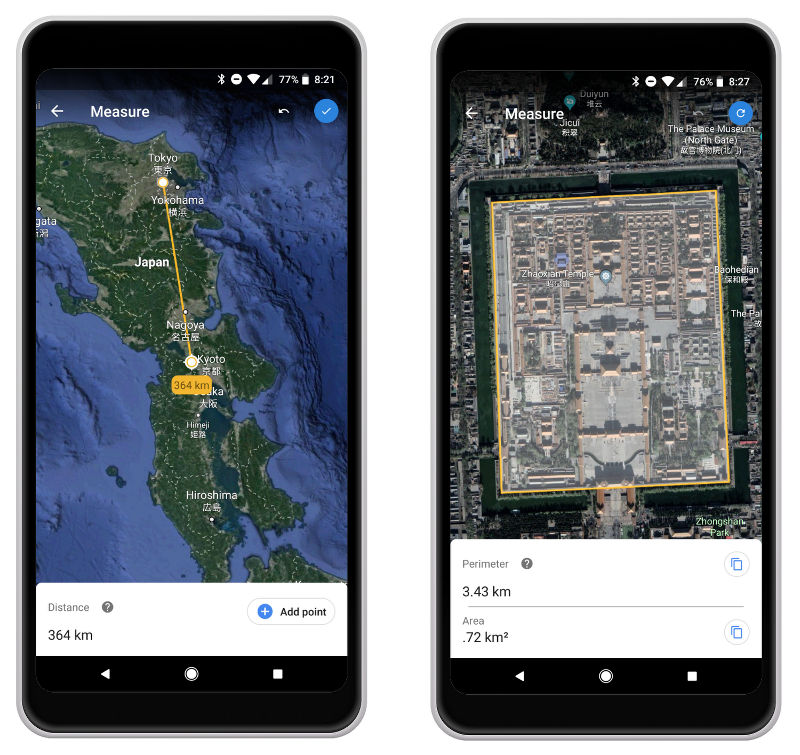
 Google today is introducing a new Google Earth measure tool for Chrome and Android. This tool will allow users to measure the distances between two points on Google Earth. Google says that this move comes as it remains the most requested features as it brings the ability to measure a certain area and measure the distance on Google Earth. How can you measure in Google Earth on Android or Chrome: On your Android phone or tablet / Desktop, open the Google Earth. Search for a place, or select a location on the globe At the top, tap More Measure on Android / On the left, click Measure distance . Google Earth will switch to a top-down view on Desktop To add measurement points, move the map and tap Add point on Android / Click the map to set measurement points on Desktop To remove a point, at the top, tap Undo . When finished, at the top, tap Done . On the bottom, you’ll see the distance measurement on Android / To complete your line measurement, double-click on your last point, or click Done on Desktop This feature would allow you to check the size of a park in your neighborhood, know answers to which city is bigger. It also gets the ...
Tuesday, 26 June 2018
Google Earth measure tool for Android and Chrome released, coming to iOS soon
Google today is introducing a new Google Earth measure tool for Chrome and Android. This tool will allow users to measure the distances between two points on Google Earth. Google says that this move comes as it remains the most requested features as it brings the ability to measure a certain area and measure the distance on Google Earth. How can you measure in Google Earth on Android or Chrome: On your Android phone or tablet / Desktop, open the Google Earth. Search for a place, or select a location on the globe At the top, tap More Measure on Android / On the left, click Measure distance . Google Earth will switch to a top-down view on Desktop To add measurement points, move the map and tap Add point on Android / Click the map to set measurement points on Desktop To remove a point, at the top, tap Undo . When finished, at the top, tap Done . On the bottom, you’ll see the distance measurement on Android / To complete your line measurement, double-click on your last point, or click Done on Desktop This feature would allow you to check the size of a park in your neighborhood, know answers to which city is bigger. It also gets the ...


-
Here are the social profile links that I have worked on for Backlinks https://docs.google.com/presentation/d/1gAvVQYafqO_jWsSIz3N95Sy3q5KAx...
-
The Optimus L4 II E440 owners may also want to keep their device up-to-date. So we thought of giving you a tutorial of how to upgrade Opt...
-
Vivo launched the vivo V17 smartphone late last year in India with a Super AMOLED display, 32MP in-screen camera, and more. The successor t...
