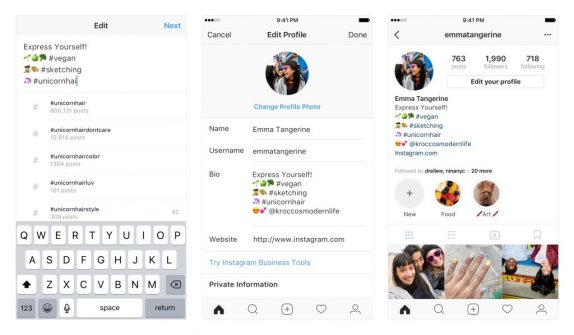
 Instagram is now rolling out a new update that will let you have hashtag and profile links in the bio, which according to the company is a new way to express yourself and the things you care. Now when you include a # or @ in your bio, they will become live links that lead to a hashtag page or another profile. With hashtag and profile links in the bio, users will have the option to express more about themselves right in the profile. The company says that users can link to any hashtag or profile they want. To add hashtags, you will have to click on edit profile and go to the bio section. From there, when you type a # or @, you will see a list of recommended hashtags and accounts in the typeahead. Once you select the hashtags and accounts you want, they will automatically be linked to your bio. Instagram will notify users when you link others in your bio and can choose to remove the link to their profile. Their profile will remain in your bio but without a link. Source
Thursday, 22 March 2018
Instagram now lets you add hashtags and profile links in bio
Instagram is now rolling out a new update that will let you have hashtag and profile links in the bio, which according to the company is a new way to express yourself and the things you care. Now when you include a # or @ in your bio, they will become live links that lead to a hashtag page or another profile. With hashtag and profile links in the bio, users will have the option to express more about themselves right in the profile. The company says that users can link to any hashtag or profile they want. To add hashtags, you will have to click on edit profile and go to the bio section. From there, when you type a # or @, you will see a list of recommended hashtags and accounts in the typeahead. Once you select the hashtags and accounts you want, they will automatically be linked to your bio. Instagram will notify users when you link others in your bio and can choose to remove the link to their profile. Their profile will remain in your bio but without a link. Source


-
Here are the social profile links that I have worked on for Backlinks https://docs.google.com/presentation/d/1gAvVQYafqO_jWsSIz3N95Sy3q5KAx...
-
The Optimus L4 II E440 owners may also want to keep their device up-to-date. So we thought of giving you a tutorial of how to upgrade Opt...
-
Vivo launched the vivo V17 smartphone late last year in India with a Super AMOLED display, 32MP in-screen camera, and more. The successor t...
