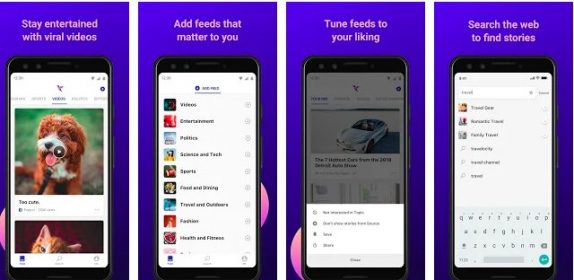
 Microsoft has released Hummingbird, an AI-powered News app for Android which currently is only available in the USA. The app offers login in through Microsoft or LinkedIn accounts, but you can go ahead by skipping. The main home screen offers various topics for you to chose from. However, unlike Google News, you can't pin down your choices to granular options like a specific sports team or player, or company, or celebrity. Instead, you get general categories like NBA, celebrities, road trips, and cooking. Once the choices are made, the feed gets updated with the articles that you're probably interested in. It also enables you to save, share, dislike articles, or simply just block all news from that particular source. Tapping an article opens it in the original site it was published in, but keeps Hummingbird's title bar where you can switch into a reading mode with control over font, background color, and text size as well as copy the URL. There's also a"Search" tab that acts more like a shortcut to general topics, and "Me" takes you to view your topics, saved articles, and history. Other settings include clear all your data and to disable automatic video and GIF playback. Since it is powered ...
Thursday, 13 December 2018
Microsoft Hummingbird AI-powered news App for Android released
Microsoft has released Hummingbird, an AI-powered News app for Android which currently is only available in the USA. The app offers login in through Microsoft or LinkedIn accounts, but you can go ahead by skipping. The main home screen offers various topics for you to chose from. However, unlike Google News, you can't pin down your choices to granular options like a specific sports team or player, or company, or celebrity. Instead, you get general categories like NBA, celebrities, road trips, and cooking. Once the choices are made, the feed gets updated with the articles that you're probably interested in. It also enables you to save, share, dislike articles, or simply just block all news from that particular source. Tapping an article opens it in the original site it was published in, but keeps Hummingbird's title bar where you can switch into a reading mode with control over font, background color, and text size as well as copy the URL. There's also a"Search" tab that acts more like a shortcut to general topics, and "Me" takes you to view your topics, saved articles, and history. Other settings include clear all your data and to disable automatic video and GIF playback. Since it is powered ...

