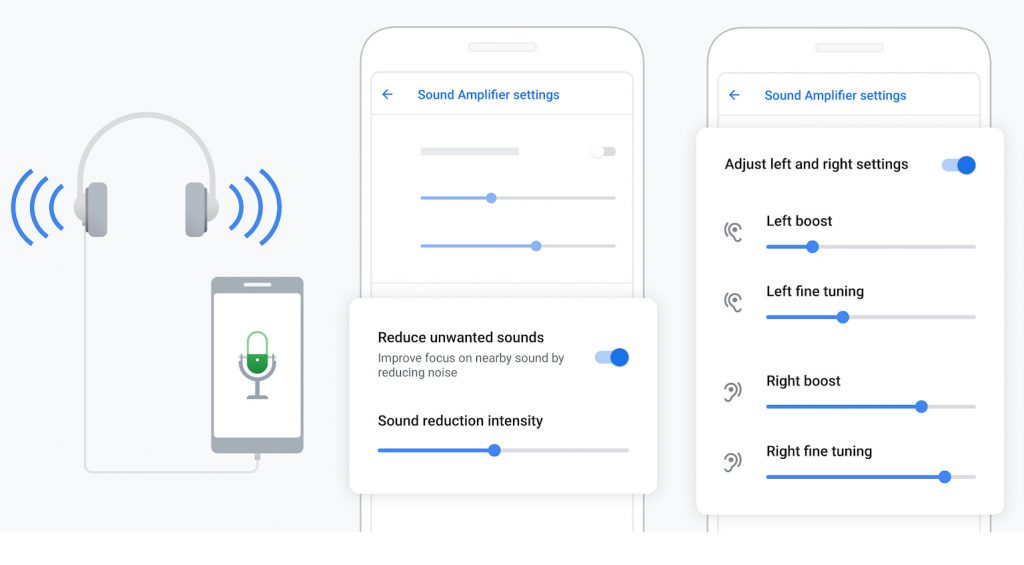
 Google released Sound Amplifier app back in February this year for phones running Android 9 Pie or later and it came pre-installed on Pixel 3 phones. Google has updated the app to support Android devices running Android 6.0 Marshmallow and above. The app enhances audio from your Android device using headphones to provide a more comfortable and natural listening experience. Sound Amplifier uses machine learning that augments sound and filters out background noise for people who have hearing loss. https://www.youtube.com/watch?v=YnKt6w34I40 The app has also been redesigned with new UI and several new features, including option to launch the app directly from your phone’s home screen instead of tapping into Accessibility settings, and with the reorganized the control settings, you can easily tap between boosting your sound or filtering out the background noise. To start using Sound Amplifier, plug in wired headphones (required) then go to Settings > Accessibility > Sound Amplifier. Sound Amplifier is available on the Play Store and supports phone running Android 6.0 Marshmallow or later. Source
Wednesday, 24 July 2019
Google Sound Amplifier hearing assistance app now available for Android 6.0+ devices
Google released Sound Amplifier app back in February this year for phones running Android 9 Pie or later and it came pre-installed on Pixel 3 phones. Google has updated the app to support Android devices running Android 6.0 Marshmallow and above. The app enhances audio from your Android device using headphones to provide a more comfortable and natural listening experience. Sound Amplifier uses machine learning that augments sound and filters out background noise for people who have hearing loss. https://www.youtube.com/watch?v=YnKt6w34I40 The app has also been redesigned with new UI and several new features, including option to launch the app directly from your phone’s home screen instead of tapping into Accessibility settings, and with the reorganized the control settings, you can easily tap between boosting your sound or filtering out the background noise. To start using Sound Amplifier, plug in wired headphones (required) then go to Settings > Accessibility > Sound Amplifier. Sound Amplifier is available on the Play Store and supports phone running Android 6.0 Marshmallow or later. Source


-
Here are the social profile links that I have worked on for Backlinks https://docs.google.com/presentation/d/1gAvVQYafqO_jWsSIz3N95Sy3q5KAx...
-
Yi technology, the company which is backed by Xiaomi recently launched products like Yi Home Camera 3, Yi Action Camera, Yi Home Security C...
-
Realme launched the Realme 3 Pro with Snapdragon 710 processor, up to 6GB RAM, Dual rear cameras last week in India. The smartphone went on...

