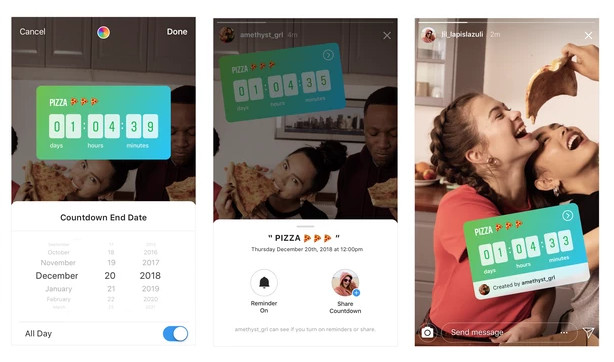
 Instagram has announced that starting today; you’ll see new ways to interact with your friends and form a deeper connection with the people you follow on Instagram. You can now use the questions sticker for music recommendations in Stories. You’ll also see a new interactive sticker in Stories that lets you count down to exciting moments together. Your friends can now respond to your questions sticker with a song from the music library, and you can share your favorites with your story. There is a new music icon when you use the questions sticker. When your friends respond, they can choose a song directly from the music library to share with you. Open the viewer’s list to see all their responses, and tap the play button to listen to the songs. When you share your favorites to your story, you’ll be able to capture a photo or video as the music plays in the background. You’ll also see new effects in the camera that respond to the beats and sounds of a song. To try the new effects, swipe to “Music” in the camera, and you’ll see the new icons above the camera capture button. The music features will be rolling out ...
Tuesday, 18 December 2018
Instagram gets sticker for music recommendations, interactive countdown sticker and more
Instagram has announced that starting today; you’ll see new ways to interact with your friends and form a deeper connection with the people you follow on Instagram. You can now use the questions sticker for music recommendations in Stories. You’ll also see a new interactive sticker in Stories that lets you count down to exciting moments together. Your friends can now respond to your questions sticker with a song from the music library, and you can share your favorites with your story. There is a new music icon when you use the questions sticker. When your friends respond, they can choose a song directly from the music library to share with you. Open the viewer’s list to see all their responses, and tap the play button to listen to the songs. When you share your favorites to your story, you’ll be able to capture a photo or video as the music plays in the background. You’ll also see new effects in the camera that respond to the beats and sounds of a song. To try the new effects, swipe to “Music” in the camera, and you’ll see the new icons above the camera capture button. The music features will be rolling out ...


-
Here are the social profile links that I have worked on for Backlinks https://docs.google.com/presentation/d/1gAvVQYafqO_jWsSIz3N95Sy3q5KAx...
-
Yi technology, the company which is backed by Xiaomi recently launched products like Yi Home Camera 3, Yi Action Camera, Yi Home Security C...
-
Micromax just launched Bharat GO, the company's first Android Oreo (Go Edition) smartphone in India, in partnership with Airtel. It was...

