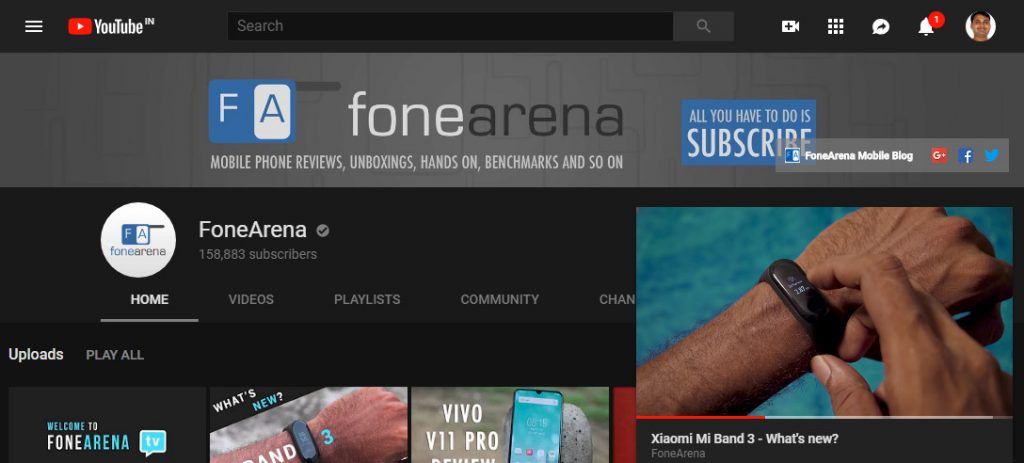
 Update - YouTube has announced the Miniplayer button on desktop officially. This lets you keep watching your video while you browse. Check out the changelog and fixes below. Pause, seek, and play the previous/next video using controls on the Miniplayer Dismiss the Miniplayer by hitting the “X” button or ESC on your keyboard Go back to the regular video, by clicking on the Miniplayer title or on the Miniplayer video player (outside of the controls) Also supports Playlists, Livestreams, and more! Fixes: Some upcoming live videos were showing the "upcoming" time in the wrong timezone, fixed that! Added a "SAVE" label to the save to playlist button on video pages. Now everything’s more consistent across web and our mobile apps! The text in some pop-up windows (for example, the window that appears when you click Share > Embed) would run over the edge of the window, fixed that! Some three-dot menu items were showing up blank with no info, fixed that! When you click ‘Share’ and use the ‘Start At’ checkbox, the time would sometimes be out of sync with the URL, fixed that! Have you seen it??🔎 👩💻 The new Miniplayer button on desktop lets you keep watching your video while you browse! Learn ...
Thursday, 18 October 2018
YouTube Miniplayer for the web now rolling out widely [Update: Official]
Update - YouTube has announced the Miniplayer button on desktop officially. This lets you keep watching your video while you browse. Check out the changelog and fixes below. Pause, seek, and play the previous/next video using controls on the Miniplayer Dismiss the Miniplayer by hitting the “X” button or ESC on your keyboard Go back to the regular video, by clicking on the Miniplayer title or on the Miniplayer video player (outside of the controls) Also supports Playlists, Livestreams, and more! Fixes: Some upcoming live videos were showing the "upcoming" time in the wrong timezone, fixed that! Added a "SAVE" label to the save to playlist button on video pages. Now everything’s more consistent across web and our mobile apps! The text in some pop-up windows (for example, the window that appears when you click Share > Embed) would run over the edge of the window, fixed that! Some three-dot menu items were showing up blank with no info, fixed that! When you click ‘Share’ and use the ‘Start At’ checkbox, the time would sometimes be out of sync with the URL, fixed that! Have you seen it??🔎 👩💻 The new Miniplayer button on desktop lets you keep watching your video while you browse! Learn ...


-
Here are the social profile links that I have worked on for Backlinks https://docs.google.com/presentation/d/1gAvVQYafqO_jWsSIz3N95Sy3q5KAx...
-
Yi technology, the company which is backed by Xiaomi recently launched products like Yi Home Camera 3, Yi Action Camera, Yi Home Security C...
-
Micromax just launched Bharat GO, the company's first Android Oreo (Go Edition) smartphone in India, in partnership with Airtel. It was...

