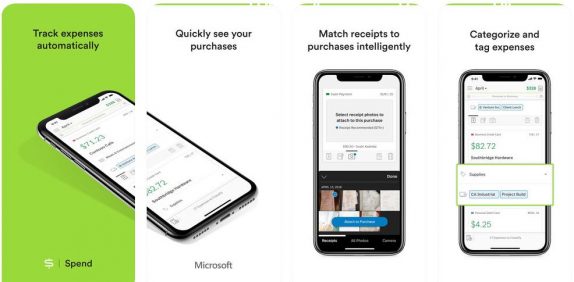
 The Microsoft-owned team behind the creation of MileIQ has introduced an iOS app to simplify expense management; Spend. It is a Microsoft Garage project which launched dozens of projects since its creation in 2014 and now 'Spend' joins a host of Garage projects. Microsoft says that 'Spend' is mobile-first and built with the user in mind, making it simple to track expenses for reimbursements or taxes. It lets you quickly manage all your purchases for your expense reports with automatically tracked expenses from a connected credit card, debit card or bank account. You can also see purchases in a feed and easily classify expenses as business or personal with a single swipe. You can create accurate reports with only a few clicks for the week, month, or another customer period. Fully customize reports which are available in either spreadsheet or PDF. Furthermore, you can also snap pictures of receipts and attach them to purchase with additional features for easy cash purchase management. Spend uses 256-bit encryption, bank-level security, with Microsoft certifications. You can download the Spend: Easy Automatic Expenses app for your iOS device from the App Store. Heman Chawda, Product Manager for Spend said: Keeping, sorting, and tracking paper receipts is annoying and inefficient. Spend uses ...
Friday, 19 October 2018
Microsoft ‘Spend’ expense management app for iOS released
The Microsoft-owned team behind the creation of MileIQ has introduced an iOS app to simplify expense management; Spend. It is a Microsoft Garage project which launched dozens of projects since its creation in 2014 and now 'Spend' joins a host of Garage projects. Microsoft says that 'Spend' is mobile-first and built with the user in mind, making it simple to track expenses for reimbursements or taxes. It lets you quickly manage all your purchases for your expense reports with automatically tracked expenses from a connected credit card, debit card or bank account. You can also see purchases in a feed and easily classify expenses as business or personal with a single swipe. You can create accurate reports with only a few clicks for the week, month, or another customer period. Fully customize reports which are available in either spreadsheet or PDF. Furthermore, you can also snap pictures of receipts and attach them to purchase with additional features for easy cash purchase management. Spend uses 256-bit encryption, bank-level security, with Microsoft certifications. You can download the Spend: Easy Automatic Expenses app for your iOS device from the App Store. Heman Chawda, Product Manager for Spend said: Keeping, sorting, and tracking paper receipts is annoying and inefficient. Spend uses ...


-
Here are the social profile links that I have worked on for Backlinks https://docs.google.com/presentation/d/1gAvVQYafqO_jWsSIz3N95Sy3q5KAx...
-
Yi technology, the company which is backed by Xiaomi recently launched products like Yi Home Camera 3, Yi Action Camera, Yi Home Security C...
-
Micromax just launched Bharat GO, the company's first Android Oreo (Go Edition) smartphone in India, in partnership with Airtel. It was...

