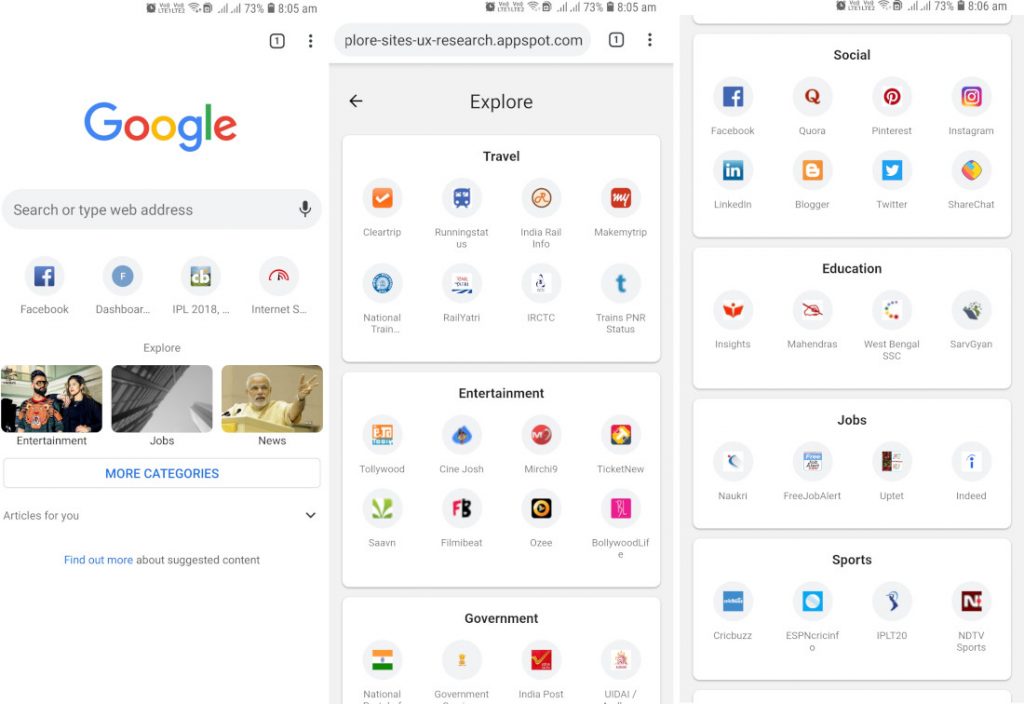
 Google is testing a new content discovery interface in the Chrome browser's new tab page called 'Explore.' Users can access it on Android by enabling an experimental flag. It is clear that the interface is currently in early stages as it contains a large number of placeholder sites at the moment. Interestingly, most of these placeholders are specific to the Indian users but doesn't necessarily mean, they are targeted just for the Indian market as the websites appearing in the new UI have been chosen as examples by the team that is behind the development. To put this feature in short, it can be a channel in the browser that could potentially be of interest to the user. However, it is unclear if this would be based on your individual habits or if it will be more broadly tailored to locales and regions than specific users. To enable the Explore interface, go to chrome://flags in your browser, search for 'explore', and you should see the 'Explore websites' flag. Set it to 'enabled' and relaunch Chrome, then open a new tab. The Explore interface should then appear on the new tab page. As said, since it is in the early stages, the feature might not ...
Friday, 12 October 2018
Google is testing new ‘Explorer UI’ in Chrome’s new page tab
Google is testing a new content discovery interface in the Chrome browser's new tab page called 'Explore.' Users can access it on Android by enabling an experimental flag. It is clear that the interface is currently in early stages as it contains a large number of placeholder sites at the moment. Interestingly, most of these placeholders are specific to the Indian users but doesn't necessarily mean, they are targeted just for the Indian market as the websites appearing in the new UI have been chosen as examples by the team that is behind the development. To put this feature in short, it can be a channel in the browser that could potentially be of interest to the user. However, it is unclear if this would be based on your individual habits or if it will be more broadly tailored to locales and regions than specific users. To enable the Explore interface, go to chrome://flags in your browser, search for 'explore', and you should see the 'Explore websites' flag. Set it to 'enabled' and relaunch Chrome, then open a new tab. The Explore interface should then appear on the new tab page. As said, since it is in the early stages, the feature might not ...


-
Here are the social profile links that I have worked on for Backlinks https://docs.google.com/presentation/d/1gAvVQYafqO_jWsSIz3N95Sy3q5KAx...
-
Yi technology, the company which is backed by Xiaomi recently launched products like Yi Home Camera 3, Yi Action Camera, Yi Home Security C...
-
Micromax just launched Bharat GO, the company's first Android Oreo (Go Edition) smartphone in India, in partnership with Airtel. It was...

