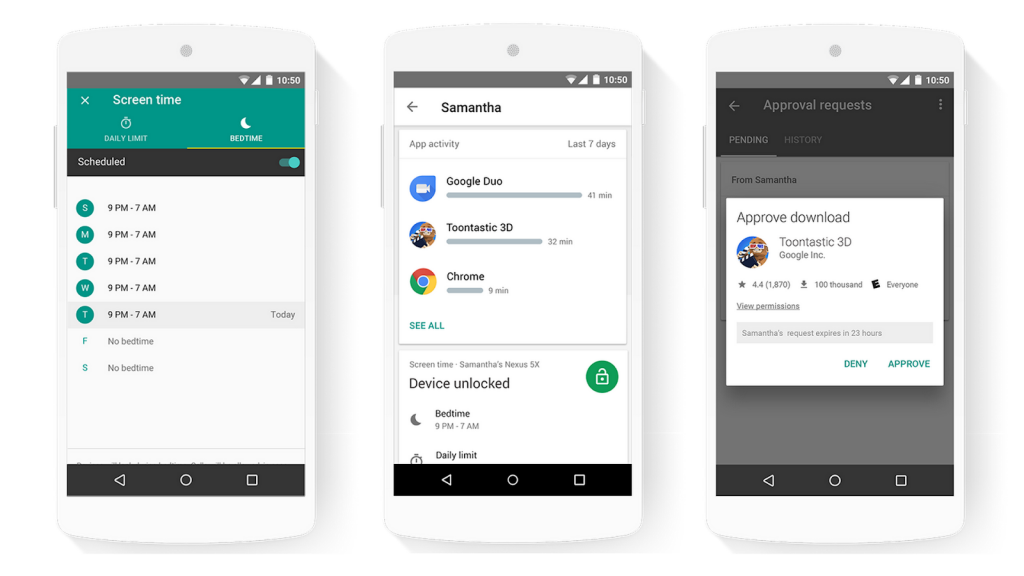
 Last year, Google introduced the Family Link app last year to help parents stay in the loop while their kids are using Android devices. Family Link helps parents keep an eye on screen time, manage the apps their kids can use and more. Today, the company has started rolling out Family Link globally including India, Hong Kong, Indonesia, Malaysia, Myanmar, Pakistan, Philippines, South Korea, Singapore, Thailand and Vietnam, as well as Colombia, Costa Rica, Ecuador, El Salvador, Panamá and Perú. Whenever you set up your kid's Android device, Google asks you to create an account. Enter your kid’s birthday, and if they’re under 13 (or the relevant age of consent depending on your region), you’ll be asked to provide consent to create the account. Once done, Family Link will automatically be downloaded to your kid's device, and you can choose the apps and settings that you want for your child. With this app, parents can set screen time limits, remotely lock a device, locate their child, view activity reports showing how much time their child spends on their apps, Approve or block apps as well. Looks like the app is rolling out gradually, since Google Play still says the app is not available for India. Source 1, ...
Wednesday, 19 September 2018
Google rolls out Family Link app to more countries, expands parental controls to manage teens
Last year, Google introduced the Family Link app last year to help parents stay in the loop while their kids are using Android devices. Family Link helps parents keep an eye on screen time, manage the apps their kids can use and more. Today, the company has started rolling out Family Link globally including India, Hong Kong, Indonesia, Malaysia, Myanmar, Pakistan, Philippines, South Korea, Singapore, Thailand and Vietnam, as well as Colombia, Costa Rica, Ecuador, El Salvador, Panamá and Perú. Whenever you set up your kid's Android device, Google asks you to create an account. Enter your kid’s birthday, and if they’re under 13 (or the relevant age of consent depending on your region), you’ll be asked to provide consent to create the account. Once done, Family Link will automatically be downloaded to your kid's device, and you can choose the apps and settings that you want for your child. With this app, parents can set screen time limits, remotely lock a device, locate their child, view activity reports showing how much time their child spends on their apps, Approve or block apps as well. Looks like the app is rolling out gradually, since Google Play still says the app is not available for India. Source 1, ...


-
Here are the social profile links that I have worked on for Backlinks https://docs.google.com/presentation/d/1gAvVQYafqO_jWsSIz3N95Sy3q5KAx...
-
Yi technology, the company which is backed by Xiaomi recently launched products like Yi Home Camera 3, Yi Action Camera, Yi Home Security C...
-
Micromax just launched Bharat GO, the company's first Android Oreo (Go Edition) smartphone in India, in partnership with Airtel. It was...

