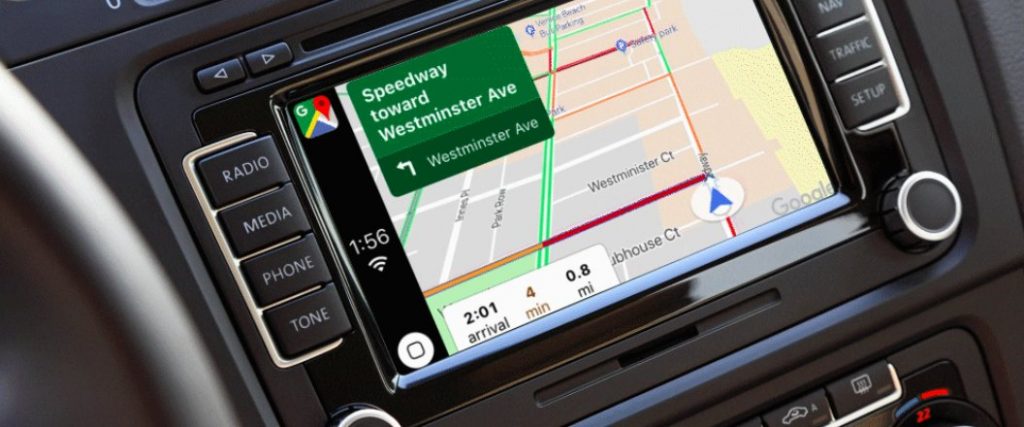
 Apple today announced that Google Maps is now supported on Apple CarPlay, meaning that iPhone users can now replace Apple Maps with Google Maps for navigation. Google Maps on CarPlay features the same navigation experience found in the app. Search for places, see alternative routes, up to date information about traffic jams and delays happening and more. Google Maps on CarPlay lets you start navigation from your iPhone and immediately pick up where you left off once you’ve connected to CarPlay. Users can also download Maps of an area so that they can see direction even when not connected to the internet. You can access any of your saved lists from Google Maps on CarPlay, and quickly navigate to those places with a single tap. However, iPhones should be running on iOS 12 to use Google Maps on CarPlay. Also, you cannot use Siri to control Maps. The Google Maps is now available to use with CarPlay on all CarPlay supported vehicles and devices globally. You need to update your Google Maps app to Version 5.0 in the App Store and connect your iPhone via CarPlay. Source
Wednesday, 19 September 2018
Apple CarPlay in iOS 12 now supports Google Maps
Apple today announced that Google Maps is now supported on Apple CarPlay, meaning that iPhone users can now replace Apple Maps with Google Maps for navigation. Google Maps on CarPlay features the same navigation experience found in the app. Search for places, see alternative routes, up to date information about traffic jams and delays happening and more. Google Maps on CarPlay lets you start navigation from your iPhone and immediately pick up where you left off once you’ve connected to CarPlay. Users can also download Maps of an area so that they can see direction even when not connected to the internet. You can access any of your saved lists from Google Maps on CarPlay, and quickly navigate to those places with a single tap. However, iPhones should be running on iOS 12 to use Google Maps on CarPlay. Also, you cannot use Siri to control Maps. The Google Maps is now available to use with CarPlay on all CarPlay supported vehicles and devices globally. You need to update your Google Maps app to Version 5.0 in the App Store and connect your iPhone via CarPlay. Source


-
Here are the social profile links that I have worked on for Backlinks https://docs.google.com/presentation/d/1gAvVQYafqO_jWsSIz3N95Sy3q5KAx...
-
Yi technology, the company which is backed by Xiaomi recently launched products like Yi Home Camera 3, Yi Action Camera, Yi Home Security C...
-
Micromax just launched Bharat GO, the company's first Android Oreo (Go Edition) smartphone in India, in partnership with Airtel. It was...

